

5 Free Software Tools. These are not random apps. These are the ones I actually use every single day. And yes — all 100% free.
Last year my friend paid ₹800 for a PDF editing app. I watched him enter his card details and I felt physical pain.
Because I use a free tool that does the exact same thing. Actually it does more. And it costs zero rupees. Zero.
That day I realized something. Most people do not know about the best free software tools because nobody talks about them. Everyone talks about Photoshop, Microsoft Office, WinRAR — the big paid names. But the really useful free stuff? It just sits there quietly, helping the people who found it by accident.
I found most of these tools by accident. And today I want to share all of them with you.
These are 5 free software tools that I actually use. Real experience. Honest opinion. No paid promotion. Just tools that genuinely changed how I use my PC.
If you are a student, a working person, or just someone who uses a computer daily — this list is for you.
LocalSend — Send Files Between Any Device Without Internet
Okay this one I found when I was genuinely frustrated.
I had a file on my laptop. I needed it on my phone. I did not have good internet that day. I tried Bluetooth — too slow. I tried WhatsApp — it compressed the file and ruined it. I almost used a USB cable like it was 2010.
Then my college friend said “bro just use LocalSend.”
I downloaded it. Used it. And I have never gone back.
LocalSend is a free software that sends files between any devices on the same Wi-Fi — phone to laptop, laptop to phone, Windows to iPhone, Android to Mac — anything to anything. No internet needed. No account needed. No sign up. Just open the app on both devices and send.
The speed is insane. I once sent a 2GB video from my laptop to my phone in less than a minute. Try doing that on Bluetooth.
And the best part? It works on Windows, Mac, Linux, Android, and iPhone. All platforms. All free.
If you transfer files between devices even once a week — just download LocalSend right now. It is one of those free productivity tools that you will use every single day and wonder how you ever lived without it.
Download: localsend.org — 100% free, open source
Everything — Find Any File on Your PC in 0.1 Seconds
Okay real talk. Windows search is terrible.
You type a file name. It thinks for 30 seconds. Shows you random results. Does not find what you need. You give up and manually search through folders like it is 1995.
Everything is the fix for this. And it is the most underrated software I have ever used in my life.
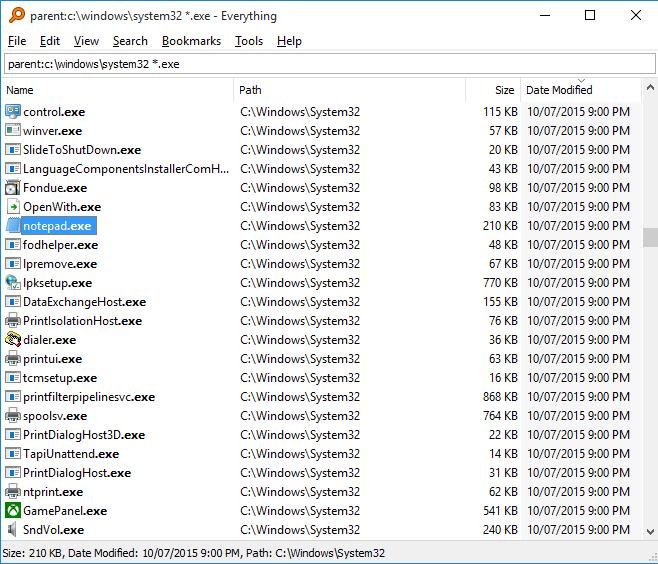
You install it. It indexes your entire PC in maybe 2 minutes. After that — you type any file name and it shows you the result instantly. Not in 5 seconds. Not in 2 seconds. Instantly. Like before you even finish typing.
I once had a college assignment saved somewhere on my laptop. I did not remember the folder. I did not remember the full name. I just typed 2 words I remembered from the title. Everything found it in literally 0.1 seconds.
I use this tool maybe 15 to 20 times every single day. It has saved me so much time I cannot even calculate it.
It is only for Windows but if you are on Windows and you do not have Everything installed — you are wasting time every single day without knowing it.
This is one of those hidden software tools that every PC user should have but almost nobody talks about. Completely free. Very small file size. No ads. No account. Just pure speed.
Download: voidtools.com — 100% free
Syncthing — Sync Files Between Devices Without Any Cloud
Let me ask you something. How much do you trust Google Drive with your personal files?
I used Google Drive for years. Then one day I read about how cloud companies can scan your stored files. I am not saying they do bad things with it. But the idea that my personal files are sitting on someone else’s server — that feeling is not comfortable.
Syncthing was my answer to this.
Syncthing is a free software that syncs files between your own devices directly. No cloud. No third party server. Your files go from your laptop to your PC to your phone — directly. Only your devices. Nobody else in the middle.
I set it up between my laptop and my home PC. Now any file I save on my laptop automatically appears on my PC. Same folder. Always updated. No internet upload needed. No subscription. No storage limit because it uses your own device storage.
Yes the setup takes maybe 20 minutes the first time. But after that it just works silently in the background forever.
This is one of the best free software tools for anyone who cares about privacy. Your files. Your devices. Your control. Zero cost.
If you are tired of paying for cloud storage every month — Syncthing is one of the best free alternatives to paid software like Google One or iCloud.
Download: syncthing.net — 100% free, open source
Ventoy — Put 50 Operating Systems on One USB Drive
Okay this one is for the slightly more technical people. But I promise it is simpler than it sounds.
You know how normally to install Windows or Linux from a USB you have to format the whole USB, use a special tool, wait 20 minutes, and then that USB becomes only useful for that one OS?
Ventoy removes all of that pain.
You install Ventoy on a USB drive once. Just once. After that — you just copy any ISO file directly onto the USB like a normal file. That’s it. Done. Ventoy handles everything automatically.
And the best part — you can put many ISO files on the same USB. Windows 10, Windows 11, Ubuntu, Kali Linux — all on one single USB drive. When you boot from it Ventoy shows you a simple menu and you pick which one to use.
I have a 64GB USB with 6 different operating systems on it right now. It looks like a normal USB for storing files. But it is also a full bootable drive for any OS I need.
For anyone who works with computers, helps friends reinstall Windows, or just likes experimenting with Linux — Ventoy is one of the most powerful free Windows software tools you will ever find.
Before Ventoy I had 4 different USB drives for different OS installs. Now I have one. That USB lives in my bag permanently.
Download: ventoy.net — 100% free, open source
Stirling PDF — Do Everything With PDFs For Free
Remember my friend who paid ₹800 for a PDF app?
This is what I showed him after.
Stirling PDF is a free tool that does literally everything with PDF files. Merge PDFs. Split PDFs. Compress PDFs. Convert PDF to Word. Word to PDF. Add page numbers. Remove pages. Rotate pages. Add watermark. Remove watermark. Password protect. Remove password. OCR on scanned PDFs.
I am not exaggerating. It does all of this. For free.
I use Stirling PDF at least 3 to 4 times every week. College assignments. Documents. Compressing files before sending. Merging multiple files into one. Everything.
Before this I was using random websites that show 10 ads, have file size limits, and who knows what they do with your uploaded documents. With Stirling PDF you can run it locally on your own computer. Your files never leave your device.
This is hands down the best must have software for any student or working person. If you deal with PDFs even once a week — you need this tool.
This is the one free software that replaces paid apps like Adobe Acrobat most directly. Same features. Zero cost. Full privacy.
Download: stirlingpdf.com — 100% free, open source
My Honest Opinion After Using All These Tools
My Honest Opinion After Using All These Tools
People always ask me — what is the best free software for Windows 11? And I always say — the best free software is the one that solves a real problem you actually have.
These 5 tools solve real problems. Problems I had personally. Problems my friends had. Problems you probably have right now without knowing there is a free solution.
LocalSend — file transfer without internet. Everything — find any file instantly. Syncthing — private file sync without cloud. Ventoy — multiple OS on one USB. Stirling PDF — everything PDF for free.
All of these are free software everyone should install. Not because someone told them to. But because they genuinely make daily computer life easier, faster, and less frustrating.
And not one of them costs a single rupee.
Quick Summary Table
| Tool | What It Does | Best For |
|---|---|---|
| LocalSend | File transfer without internet | Everyone |
| Everything | Instant file search | Windows users |
| Syncthing | Private file sync | Privacy lovers |
| Ventoy | Multi OS USB drive | Tech users |
| Stirling PDF | All PDF tasks free | Students and workers |
Conclusion
My friend still has that ₹800 PDF app on his laptop. I sent him this list last week. He downloaded Stirling PDF the same day and said “bro why did nobody tell me about this before.”
That is exactly why I wrote this article.
These are not new tools. They have been around for years. But they are powerful free software nobody knows about because nobody talks about them.
Now you know.
Pick even one tool from this list. Download it today. Use it for one week. And tell me in the comments if it helped you. I want to know which one surprised you the most. It genuinely helps me write better articles for you.
